Murlet now finds your cameras via ONVIF
Murlet, my macOS network video recorder (NVR), used to require you to supply a cryptic RTSP string for each camera:
rtsp://user:[email protected]:554/cam/realmonitor?channel=1&subtype=0How do you even construct one of these? Well, you need three pieces of information. Firstly, you find your camera's IP address, likely by logging into your router and browsing the list of devices, looking for something camera-shaped. Secondly, you probably Google for your camera model's RTSP URL. Finally, you try to find the post-it note where you wrote down your camera's password six months ago.
Good news and bad news: I can't help you find your password, but everything else is now automated. During onboarding (and later, from camera settings) we show you a list of discovered cameras:
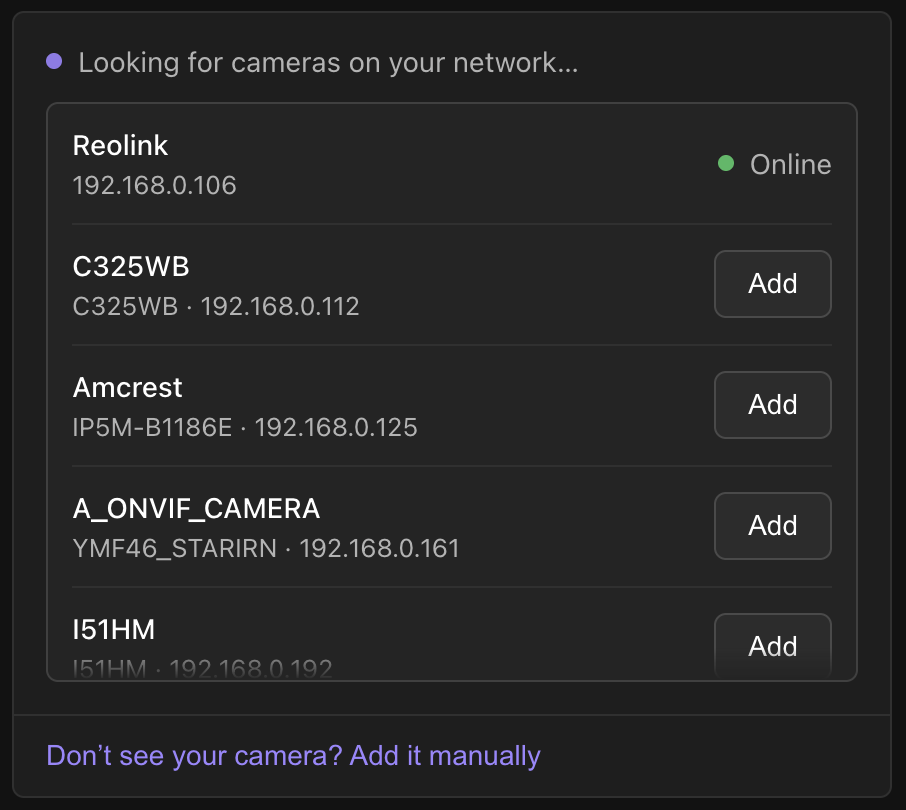
Clicking any of the "Add" buttons brings up the password dialog. Once you've added a camera, you can see its status (e.g. "Online"). We even attempt to check whether your password is valid before adding the camera.
How ONVIF discovery works
Behind the scenes, this is all driven by ONVIF. Which stands for Open Network
Video Interface Forum, obviously. We blast out a
WS-Discovery
Probe (SOAP, remember it?) to the multicast group at 239.255.255.250:3702,
and wait for any cameras to respond. This provides the list of cameras that you
see in the screenshot above. Then, once you've added a camera with a password,
we ask the camera for its RTSP address via GetStreamUri.
Easy, right? Not exactly. IP cameras are a swamp of partially implemented, non-compliant ONVIF stacks. And people connect to them in creative ways. Most of the quirks below tripped me up on my own cameras (and I flag the speculative fixes).
Probing every network interface
If we don't specify an interface when sending the multicast WS-Discovery message, it goes out on whichever one the OS picks as the default. Most of the time this finds your cameras, but if you have multiple interfaces (e.g. Wi-Fi for regular traffic, and an isolated wired network for cameras) then it may mysteriously show no devices.
We address this problem by enumerating the machine's interfaces via getifaddrs, and sending discovery messages out on each. We intentionally skip point-to-point interfaces to avoid adding cameras that are only reachable when a VPN is up.
Anchoring to the camera's clock
If you've ever had a camera reject credentials you know are correct, returning
an ONVIF ter:NotAuthorized or a WS-Security wsse:FailedAuthentication error,
a clock mismatch might be to blame. Every authenticated request we send carries
a
WS-Security digest,
which is computed as
base64(sha1(nonce + created + password))where nonce is the usual number-used-once, and created is a timestamp. Both
are also sent in the clear so that the camera can recompute the digest.
The camera will reject the message if the timestamp is too far from what it
considers to be the current time, which could be absolutely anything (two of
my cameras currently believe it's 2018... I don't have the heart to tell them).
So we first send a GetSystemDateAndTime message to learn what the camera
thinks the current time is; this is one of the few calls that ONVIF requires to
work without authentication. We then anchor all subsequent timestamps to that
value by storing the clock delta.
Cameras that lie about their address
When a camera answers our Probe, its ProbeMatch contains an XAddrs field:
a whitespace-separated list of URLs for its ONVIF device service, e.g.
http://192.168.0.125/onvif/device_service
http://[fe80::2e0:4cff:fe12:3456]/onvif/device_service
We need to connect to one of these to ask the camera anything further. The problem is that we're trusting the camera to know its own address. It might be stale if the camera has recently acquired a new address from DHCP, or maybe it's the factory-baked default if the camera is truly demonic. (All of mine tell the truth, for what n=7 is worth.)
The fix is to... not trust the camera. We pick the first http URL (skipping
https, which we don't speak), and substitute the IPv4 address that the
datagram arrived from, keeping the port and path. My assumption is that if the
camera is reachable at all, it's at the address it just answered from.
This would of course break a camera that is only reachable at the address it advertises (e.g. behind a proxy). My hope is that these cases are sufficiently rare that the rewriting approach leads to fewer connection failures overall.
Not locking yourself out
Some cameras lock you out if you enter the wrong credentials too many times. For a product that records camera streams, getting you locked out of your own cameras because you typo'd a password is Not Good. Concretely: you typo a password, our reconnect loop retries it every few seconds, and then the camera starts denying all requests. Recovery runs the gamut of sysadmin tedium, from "wait for a bit" to "power cycle the camera" to "perform a factory reset".
So when authentication fails, Murlet won't retry that password in the background for an hour:
http://192.168.0.125/onvif/device_service rejected these credentials less than 3600s ago; not retrying yetAn hour is long enough not to trip a lockout and short enough that a camera with flaky auth comes back the same day. You can retry as often as you like yourself: the backoff only applies to Murlet's own retries. We record when each credential was last rejected, so a fresh password is tried immediately.
Picking a media profile
ONVIF supports multiple media profiles, listed by GetProfiles. These
describe the different codec and resolution options available. We heuristically
pick the highest resolution stream which we can decode. Why heuristics?
Firstly, cameras may use different names for the same codec e.g. "H.264" vs
"H264" vs "h264". Secondly, some may not report an encoding at all. We keep
them, assuming a camera that can't name its codec is probably speaking H.264.
Finally, some may not report any dimensions, so again we just keep the profile,
but rank it below any profiles that report dimensions. None of mine do any of
this, so no camera has exercised these fallbacks. What could possibly go wrong?
If your camera doesn't speak ONVIF
Not all cameras support ONVIF (Hi Wyze). Some do, but only once you've dug through their settings pages to enable it (Hi Reolink). Others need their own user account, distinct from the login that you use in the web interface or mobile app (Hi Tapo, and Reolink again). So as a fallback we still support manually entering an RTSP URL.
What I didn't build
Building the perfect discovery system would take forever. Here's what didn't make the cut:
- Cameras that get a new address: It's not uncommon for a camera to be assigned a new IP address by DHCP. When this happens you have to manually reconfigure your camera in Murlet. In theory we can automatically detect the moved camera using ONVIF Endpoint Reference (EPR) addresses, which are meant to be stable, globally-unique identifiers. And, of course, some cameras reuse them across batches, or reset on reboot, so heuristics are the order of the day.
- Media profile selection: I think there's value in exposing the media profile choice, instead of always automatically deciding it for you. Higher resolution streams consume more resources, and they might not always be needed. However, I don't want to force selection of the media profile if our heuristics usually do a good-enough job.
- Manual subnet scanning: Right now we do periodic multicast "pings" while discovering cameras. This is akin to standing in the street and shouting "is anyone there?". One step up from this is to perform a TCP connect sweep of all connected networks. This is more aggressive, and more like knocking on front doors. It might also trigger corporate Intrusion Detection Systems. If Murlet were to support this behavior, it would have to be user-initiated.
- Default passwords: Many cameras ship with default passwords. We don't surface these in the UI, instead just presenting a dialog with empty user and password fields. As an alternative, I can imagine shipping a database of default credentials, and suggesting any that match the camera's manufacturer or hardware hints in the WS-Discovery replies. I wouldn't want to automatically try credentials because (i) this risks camera lockout, and (ii) trying passwords until one works is no longer in the realm of "camera setup".
Does it find your cameras?
I've tested this on the seven cameras I own, but I'm undoubtedly missing edge cases. If you're interested in helping make Murlet more robust, download the latest release and let me know if any of your cameras don't show up.