Zero-copy wgpu rendering inside an Electron app
Murlet, a macOS network video recorder (NVR), displays wgpu-rendered video frames straight into Electron without them leaving GPU memory. This contributes to a great local user experience: when a user "scrubs" within a recording, the displayed video is quickly rendered to the screen, giving the sense the output is "locked" to the cursor position. Nice, but how is this implemented? This blog post talks about two different approaches: "hole punching" and Electron's sharedTexture API, and explains why I chose hole punching.
Overview
First, a brief overview of the architecture: Murlet is decomposed into an Electron frontend and a Rust backend. The frontend is a thin React layer that is solely responsible for rendering the UI chrome and calling into the backend. The backend is where the business logic lives: it renders video (using wgpu), records RTSP streams, runs object detection and owns the data model. It is compiled into a shared library that runs within the address space of the Electron main process, and is exposed using NAPI-RS.
("Why Electron?" you might ask. Yep, good question. Basically, I know how to quickly ship with it and I think it's "good enough" for most people. That said, I'd love to explore a native implementation, and this would actually be pretty easy given the current architecture. More on that later.)
Back to business. Let's start by surveying all of our options for displaying video frames into Electron, including those that aren't zero-copy:
- Loopback restreaming: serve local RTSP / WebRTC streams from the backend, decode within Electron; requires H.264 or H.265 encode/decode round-trip. Great for uniform local/remote viewing story, terrible for latency.
- GPU readback: render to bitmaps on the backend, copy to the frontend, re-render within Electron; adds some latency, burns CPU and GPU.
- Hole punching: render to a native NSView peeking through a transparent hole in Electron's contentView. Zero-copy, platform-specific, fiddly. This is what Murlet uses.
- Electron's sharedTexture API: this imports shared textures into Electron as VideoFrames. Zero-copy, platform-agnostic, experimental. Murlet does not use this, although I did prototype it. It provides a useful comparison to the hole punching approach.
We're going to skip discussion of the first two options (loopback restreaming and GPU readback), and jump right to the zero-copy options: hole punching and Electron's sharedTexture API.
Hole punching
The hole punching approach stacks a native NSView (the "underlay") beneath Electron's contentView, onto which the backend directly renders video. We then render a transparent div within our Electron UI so that the underlay's video can peek through. (Because the backend lives inside the Electron main process, it can reach Electron's NSWindow and add the underlay.)
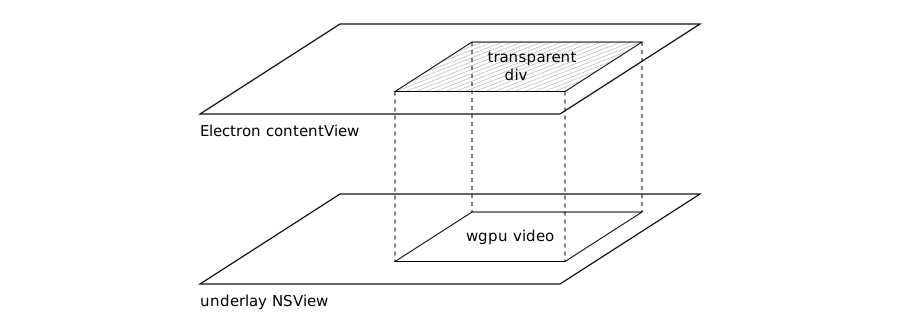
Aside: the hole punching technique has a lot of prior art. DirectDraw overlays on Windows and the XVideo extension on X11 both used color keying, where the app painted a specific color where it wanted video displayed. Android's SurfaceView docs say that its dedicated drawing surface "is behind the window holding its SurfaceView; the SurfaceView punches a hole in its window to allow its surface to be displayed." Browsers themselves try to render video using hardware overlay planes, leaving a transparent hole in the main content plane for the video to poke through. You get the idea.
The benefit of this approach is that there's very little coupling between Electron and the underlay; we just have to arrange for the frontend to tell the backend where the transparent div is located. This means that we don't have the performance impact of involving Electron's rendering pipeline for every frame. We also preserve optionality for any future native port. The flip side of the low coupling is that we're responsible for efficiently synchronizing both the location and the content of the transparent div with the backend. This is... a little nuanced.
Let's start with location synchronization. When does the location change? Either during window resizes, or else when the user moves the separator that sits between the video thumbnails and the video player on the search view. If the backend responds too slowly, then we lose the illusion that the UI is a "single pane of glass".
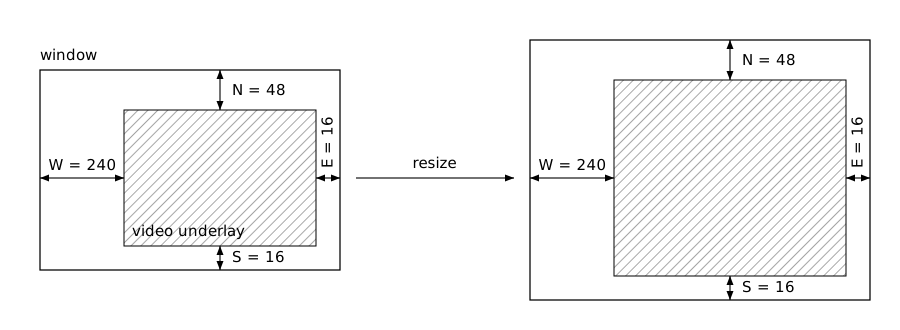
We tackle the problem of location synchronization by simulating the frontend's layout algorithms (CSS grid and flexbox) on the backend, which allows us to minimize communication. Simulation sounds complicated but it's actually straightforward because we have a very simple UI: the live view just has a navbar at the top, and otherwise the video fills the rest of the window. The search view adds a (resizable) panel on the left containing video thumbnails, and again the video fills the rest of the window.
So the div's position is fully determined by a handful of edge distances. For each edge of the transparent div, the frontend updates the backend with the distance between the div edge and the associated window edge (e.g. for the West edge of the div, the distance to the West edge of the window). Call these "insets". The backend knows the window size, so it can predict the div's location itself.
The payoff is that the insets are invariant under window resizes due to how our UI is designed: the frontend doesn't have to update the backend during resizes at all, and the positions of the div and the rendered video on the underlay stay in almost perfect agreement.
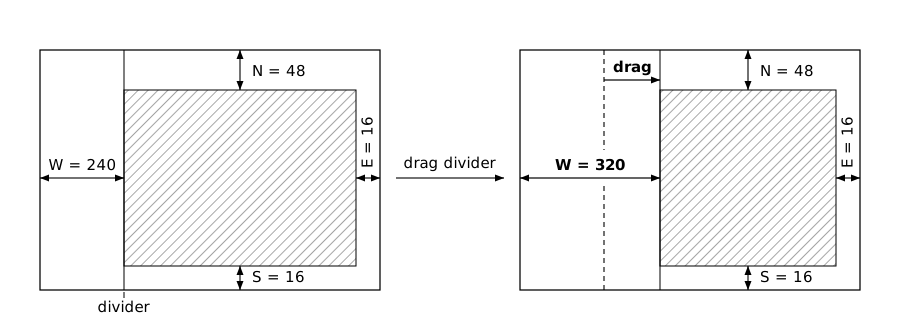
That said, it's not a perfect solution: the West inset does change when the user drags the divider on the search view, and there is some noticeable jank. My judgement is that users rarely drag the divider, and even when they do the jank isn't terrible. So a pretty good set of tradeoffs overall.
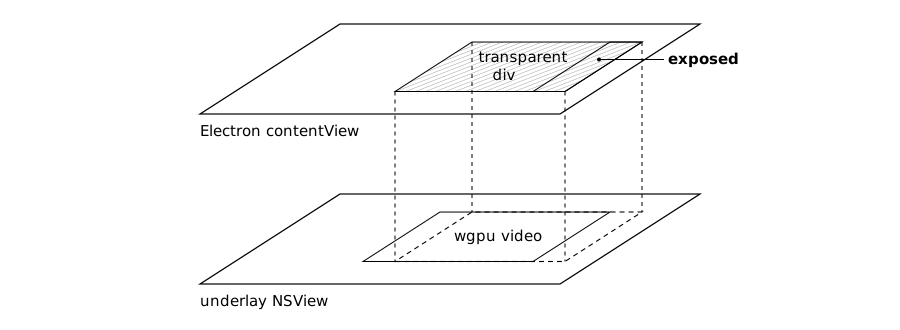
Let's now talk about content synchronization. Here the issue is that when the user switches between the live and search views we do not want to be temporarily displaying the previous view's video in the new view. Our solution is to first render the div as an opaque black region so that the preceding view's video is obscured. We then signal the backend to start rendering the new video, and then reveal it once its pixels are "on the glass". Of course, we can't actually know when a frame is visible, so we use a timing fudge factor which works well.
Electron's sharedTexture API
Now let's talk about the road not taken (but prototyped, so I guess we went down the road a little bit): Electron's sharedTexture API. The idea here is pretty cool: a platform-agnostic way of sending textures to Electron as VideoFrames, without doing any copying! And once we have video frames in the DOM, we can build much richer user experiences than permitted by hole punching, e.g. dragging and dropping live video, or applying CSS effects such as rounded corners.
But... the devil is in the details. We can't just "fire-and-forget" textures
from the backend to the frontend, because we still need to free them on the
backend after they've been composited. So actually we maintain a pool of
textures on the backend, handing them off to Electron for display. Electron then
communicates back to the backend when it's finished with a texture
(allReferencesReleased), whereupon we return the texture to the pool, ready
for reuse.
This works remarkably well during steady-state operation. Where it falls apart is resizes:
- For each resize we need to reallocate the whole pool of textures (IOSurfaces on macOS), which is not cheap. Meanwhile, existing in-flight textures have all been rendered at stale sizes, so they're stretched to fit the window's new aspect ratio.
- Frames are serviced in bursts because the Electron renderer's main thread is
busy laying out the page. And
allReferencesReleasedcallbacks are either slow or else dropped (I didn't root-cause this), causing our pool to run dry.
I ended up "fixing" this by suspending delivery of frames during window resizes. This is not great: users want to see what their video will look like while they're resizing, instead of "oh I overshot, let's dial it back a bit, oops too much, there we go". This expectation is reinforced by macOS itself (e.g. QuickTime, which live-resizes with a locked aspect ratio). Finally, I wasn't keen on building on an experimental API, especially one where a single dropped callback can cause the pool to run dry and freeze Murlet's video.
Conclusion
We looked at two approaches for zero-copy display of video frames into Electron: hole punching and Electron's sharedTexture API. Hole punching has loose coupling, uses standard Cocoa APIs, and with a bit of work supports live resizing. Electron's sharedTexture API requires much more coupling, but promises to abstract entirely over platform APIs and to make video part of the DOM. But, at least in my prototype, it gave a very poor user experience during live resize. For some, this may be ok, but for me it's a deal breaker. So Murlet ships with hole punching, and I'm pretty happy with the tradeoffs. This also leaves the door open for that native port.